Understanding JAR and Fat JAR in Spring Boot
2 min read #springboot #java #spring
A jar(java archive) file package all the java files, associated metadata and resources such as images and configuration in single zip file.
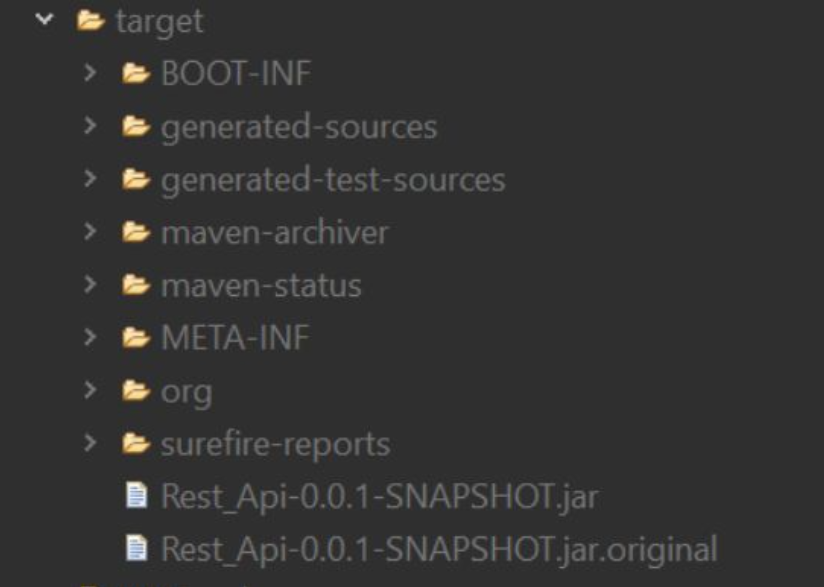
when you build a Spring Boot project, especially using tools like Maven or Gradle, you will often find two types of JAR files generated inside the target directory: the regular JAR and the Fat JAR (also known as Executable JAR or Uber JAR). Let’s delve into each of these:
🔹 JAR (Java Archive):
The primary purpose of a JAR file is to conveniently distribute a Java application or library. By packaging all the necessary files into a single JAR, developers can share their Java code easily, making it portable and self-contained.
Here are some key points:
👉 Packaging: JAR files can contain compiled Java bytecode (.class files), resources (images, XML files, properties files), and other files needed to run a Java application or library.
👉Compression: JAR files use compression to reduce the file size, which makes them more efficient for distribution.
👉 Manifest File: Each JAR file can have a manifest file (META-INF/MANIFEST.MF) that contains metadata about the JAR, such as the main class to be executed, classpath entries, and version information.
👉 Executable JAR: If the manifest file specifies the main class, the JAR can be executed as a standalone application using the java -jar command.
👉 Libraries: JAR files are commonly used to distribute Java libraries, which can be easily added to other Java projects by including the JAR file in the classpath.
🔹 Fat JAR (Java Archive):
In Spring Boot, a “fat JAR” refers to a type of executable JAR file that includes all the necessary classes and dependencies required to run a Spring Boot application. It is a self-contained JAR file that packages not only the application’s compiled classes but also all the third-party libraries (dependencies) that the application relies on.
when you create a Fat JAR in a Spring Boot application, it includes an embedded web server, which is typically Tomcat by default. The fat JAR contains everything needed to run the application, making it highly portable and easy to distribute and deploy.
Key Points:
🚀 Simplified deployment: With a fat JAR, you don’t need to manage external classpath settings or worry about deploying the application along with its dependencies.
🚀 Version Management: Fat JARs bundle specific versions of dependencies with the application. This helps avoid conflicts and ensures that the application runs with the intended versions of libraries, regardless of the system’s existing classpath.
How to create the fat jars:
👨💻 To create a fat JAR in Spring Boot, you can use either the Spring Boot Maven Plugin or the Spring Boot Gradle Plugin
In this photo Rest_Api-0.0.1-SNAPSHOT.jar is the fat jar and Rest_Api-0.0.1-SNAPSHOT.original.jar is the normal jar.
Follow for more such articles🤖🤖