Getting started with JDBC and Hibernate part-I
5 min read #jdbc #springboot #databases #mysql
What do you know about JDBC and Hibernate? In this blog we are going to get fundamentals of both and how to use them to connect to a database.
Let’s assume you have created a Java project to do crud operation on Student i.e. you want to Create, Read, Update and Delete a Book from the database. So let’s create a Basic Java Project for the same.
What is JDBC?
JDBC (Java Database Connectivity) is a Java based API and a part of the Java Standard Library that provides a standardized way for Java applications to interact with relational databases. It allows Java applications to perform various database operations such as connecting to databases, executing SQL queries, and retrieving and updating data in a database.
So let’s say we have our data to save and we also have a database setup but to save the data into the database we have to make the connection between Java and database and after making the connection we will be able to save data to the database. so to make that connection Java uses JDBC.
JDBC Drivers
- A JDBC driver is a platform-specific implementation of the Java Database Connectivity API which means Each DBMS has its own driver . It acts as a bridge between Java code and a particular database management system (DBMS) and you need the appropriate driver to connect to that specific DBMS.
- JDBC drivers are essential for establishing communication with a database. These drivers translate Java calls into database-specific calls that the DBMS can understand.
- After a driver is selected JDBC Driver Manager’s responsibility is to make a connection to the database using the driver.
There are four main types of JDBC drivers commonly referred to as Type 1, Type 2, Type 3, and Type 4. I am not going into this write now you can read about it from the documentation of jdbc.
Create a Java Project
-
Create a maven project
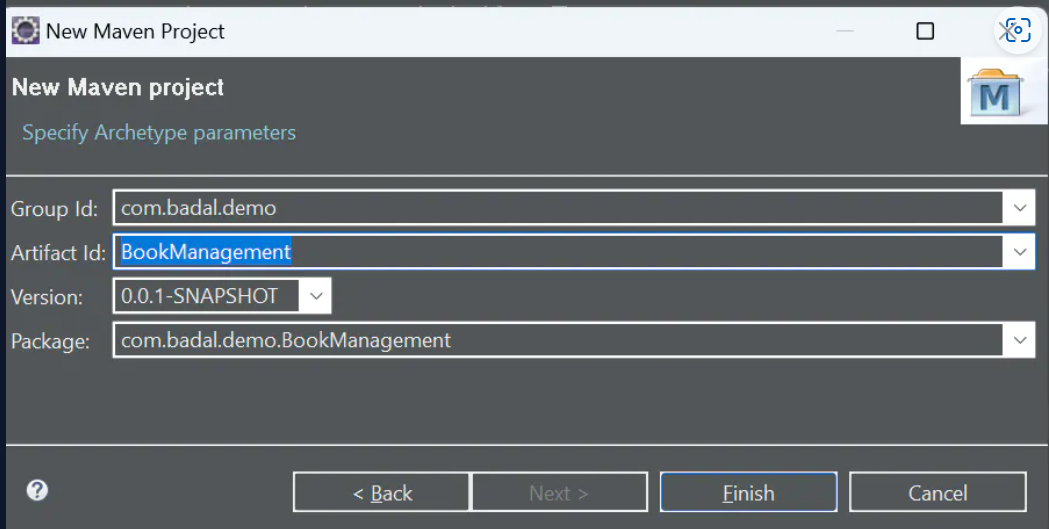
-
Project Structure
BookManagementApp │ ├── src │ └── main │ ├── java │ │ └── com │ │ └── badal │ │ └── demo │ │ └── BookManagement │ │ ├── dao │ │ │ └── BookDao.java │ │ ├── entities │ │ │ └── Book.java │ │ ├── App.java │ │ └── ... │ └── resources │ └── ... │ ├── target │ └── ... │ ├── pom.xml └── ... -
Create a Book class
  package com.badal.demo.BookManagement.entities;

  public class Book \{
      private int id;
      private String title;
      private String author;

      public int getId() \{
          return id;
      \}

      public Book(int id, String title, String author) \{
          super();
          this.id = id;
          this.title = title;
          this.author = author;

      \}

      public void setId(int id) \{
          this.id = id;
      \}

      public String getTitle() \{
          return title;
      \}

      public void setTitle(String title) \{
          this.title = title;
      \}

      public String getAuthor() \{
          return author;
      \}

      public void setAuthor(String author) \{
          this.author = author;
      \}

      @Override
      public String toString() \{
          return "Book [id=" + id + ", title=" + title + ", author=" + author + "]";
      \}

  \}
So now we have created the Book class let’s create an instance of this Book class and try to save to to database.3
-
Creating an instance of Book
      package com.badal.demo.BookManagement;

      import com.badal.demo.BookManagement.entities.Book;

      public class App \{
          public static void main(String[] args) \{
              Book book1 = new Book(1, "The Great Gatsby", "F. Scott");
              System.out.print(book1);
          \}
      \}
We have created a Book instance Now how to save it to the database?
So before saving it to the database, we need a database right? so let’s create a database first. I am using MySQL here you can use any database of you preferred choice
-
Create a Database
after creating the Database create a table mybooks in the database.
 CREATE DATABASE books;

 CREATE TABLE mybooks (
     id INT AUTO_INCREMENT PRIMARY KEY,
     title VARCHAR(255) NOT NULL,
     author VARCHAR(255) NOT NULL
 );
Now we need to add a driver class to interact with the database.
 <dependency>
     <groupId>com.mysql</groupId>
     <artifactId>mysql-connector-j</artifactId>
     <version>8.0.32</version>
 </dependency>
The MySQL Connector/J library provides the necessary classes and methods to establish a connection between your Java application and a MySQL database server. It allows you to specify the database server’s host, port, username, and password to connect to the database.
-
Connect and save the Book to the Database
There are typically 4 steps
-
Load the driver
In your Java application, you load the JDBC driver using the
Class.forName()Class.forName("com.mysql.cj.jdbc.Driver"); -
Make the connection
You establish a connection to the database using the
DriverManager.getConnection()method. This method returns aConnectionobject that represents the connection to the database.Connection connection = DriverManager.getConnection(jdbcUrl, username, password); -
Execute the query
With the
Connectionobject, you createStatementorPreparedStatementobjects to execute SQL queries against the database.Statement statement = connection.createStatement(); ResultSet resultSet = statement.executeQuery("SELECT * FROM mybooks"); -
Process The Results and Close the connection
             resultSet.close();
              statement.close();
              connection.close();
Now lets write code to save and get the Book from DataBase to interact with database we have created a class called BookDao in which we are all the logic for database interaction
-
    package com.badal.demo.BookManagement.dao;

    import java.sql.Connection;
    import java.sql.DriverManager;
    import java.sql.PreparedStatement;
    import java.sql.SQLException;
    import java.sql.Statement;

    import com.badal.demo.BookManagement.entities.Book;

    public class BookDao {

        String url = "jdbc:mysql://localhost:3306/books";
        String username = "root";
        String password = "root";

        // create jdbc connection
        public Connection getConnection() throws ClassNotFoundException, SQLException {

            // Load the driver

            Class.forName("com.mysql.cj.jdbc.Driver");

            // get the connection

            Connection connection = DriverManager.getConnection(url, username, password);

            return connection;
        }

        public void saveBook(Book book) throws SQLException, ClassNotFoundException {
            Connection connection = this.getConnection();

            // create the statement
            Statement st = connection.createStatement();

            // run the query
            String sql = "INSERT INTO mybooks (id,title, author) VALUES (?, ?, ?)";
            PreparedStatement preparedStatement = connection.prepareStatement(sql);
            preparedStatement.setInt(1, book.getId());
            preparedStatement.setString(2, book.getTitle());
            preparedStatement.setString(3, book.getAuthor());

            System.out.println(preparedStatement.executeUpdate());

        }

    public String getBook(int id) throws ClassNotFoundException, SQLException {
            Connection connection = this.getConnection();

            // create the statement
            Statement st = connection.createStatement();

            String query = "select title from mybooks where id=" + id;

            ResultSet rs = st.executeQuery(query);

            rs.next();

            return rs.getString(1);
        }

    }
Now lets test our code
    package com.badal.demo.BookManagement;

    import java.sql.SQLException;

    import com.badal.demo.BookManagement.dao.BookDao;
    import com.badal.demo.BookManagement.entities.Book;

    public class App {
        public static void main(String[] args) throws ClassNotFoundException, SQLException {
            Book book1 = new Book(1, "The Great Gatsby", "F. Scott");
            System.out.print(book1);
            BookDao dao = new BookDao();
            //save to db
            // dao.saveBook(book1);
             //get from db
            System.out.println("the title of book with id=1 is " + dao.getBook(1));

        }
    }
In the Next article we will continue learning about hibernate and why it is in demand now days also learn about why we need hibernate if there is jdbc available to connect to the database.
Stay tuned for more informative articles, and see you in the next one. Follow me for more engaging software engineering content!
Happy Coding🚀🚀