Mastering Concurrency: ThreadPool in Java Explained
10 min read #java #multithreading #software-development #system-design
Today we are going to discuss about Threads and ThreadPool. Lets understand the need of multithread
Need for Multithreading in Prime Number Counting
When counting prime numbers in a specified range, a single-threaded approach checks each number sequentially, leading to slow performance for large ranges. This happens because only one CPU core is utilized at a time, making the computation inefficient.
Multithreading improves performance by:
- Parallel Execution: Splitting the range into smaller parts, allowing multiple threads to check numbers simultaneously.
- Efficient CPU Utilization: Utilizing multiple CPU cores instead of a single one.
- Faster Processing: Reducing overall execution time by distributing the workload.
For example, if we need to count prime numbers in 1 to 1,000,000, using multiple threads can divide the range (e.g., 1-250k, 250k-500k, etc.), significantly speeding up computation compared to a single-threaded approach.
Will will se how multithreading is helping in above case but before that lets understand some core concepts of multithreading
So What is a Thread?? and how its different from a process?
So A process is an independent program execution unit with its own memory space while a thread is a lightweight unit of execution within a process that shares the same memory.
So you can think a process as you open Microsoft Word, the system creates a separate process for it. This process has its own memory space and resources, independent of other applications running on your computer.
multiple threads run simultaneously to handle different tasks efficiently. Examples include:
- Auto-save Thread: Saves the document in the background while you continue typing.
- Spell Check Thread: Continuously checks for spelling and grammar errors.
- Rendering Thread: Handles UI updates, such as scrolling or text formatting changes.
- User Input Thread: Processes keystrokes and mouse clicks.
How to create Thread in Java
In Java, there are two primary ways to create a thread:
- Extending the
Threadclass - Implementing the
Runnableinterface (whichThreadinternally implements)
Since Thread itself implements Runnable, extending Thread is essentially another way of using Runnable. However, using Runnable is preferred as it allows better flexibility (e.g., enabling multiple inheritance)
package multithreading;

public class ThreadInJava {
    public static void main(String[] args) {
        // there are two ways to create threadss in java one is by extending Thread class another is to implement runnable class

        // Thread creation using Thread class
        Thread t1= new MyThread();
        t1.start();

        System.out.println("this is  thread : "+Thread.currentThread().getName());

        //Thread using Runnable interface

        Runnable myRunnable= new MyRunnable();
        Thread t2= new Thread(myRunnable);
        t2.start();

       System.out.println("this is  thread : "+Thread.currentThread().getName());


    }
}

class MyRunnable implements Runnable{

    @Override
    public void run() {
        System.out.println("THis is Thread:  "+Thread.currentThread().getName());
    }
}

// although underthehood this Thread class will eventually implementing Runnable interface only
class MyThread extends Thread{

    @Override
    public void run() {
        System.out.println("this is another thread : "+Thread.currentThread().getName());
    }
}
Thread Pool
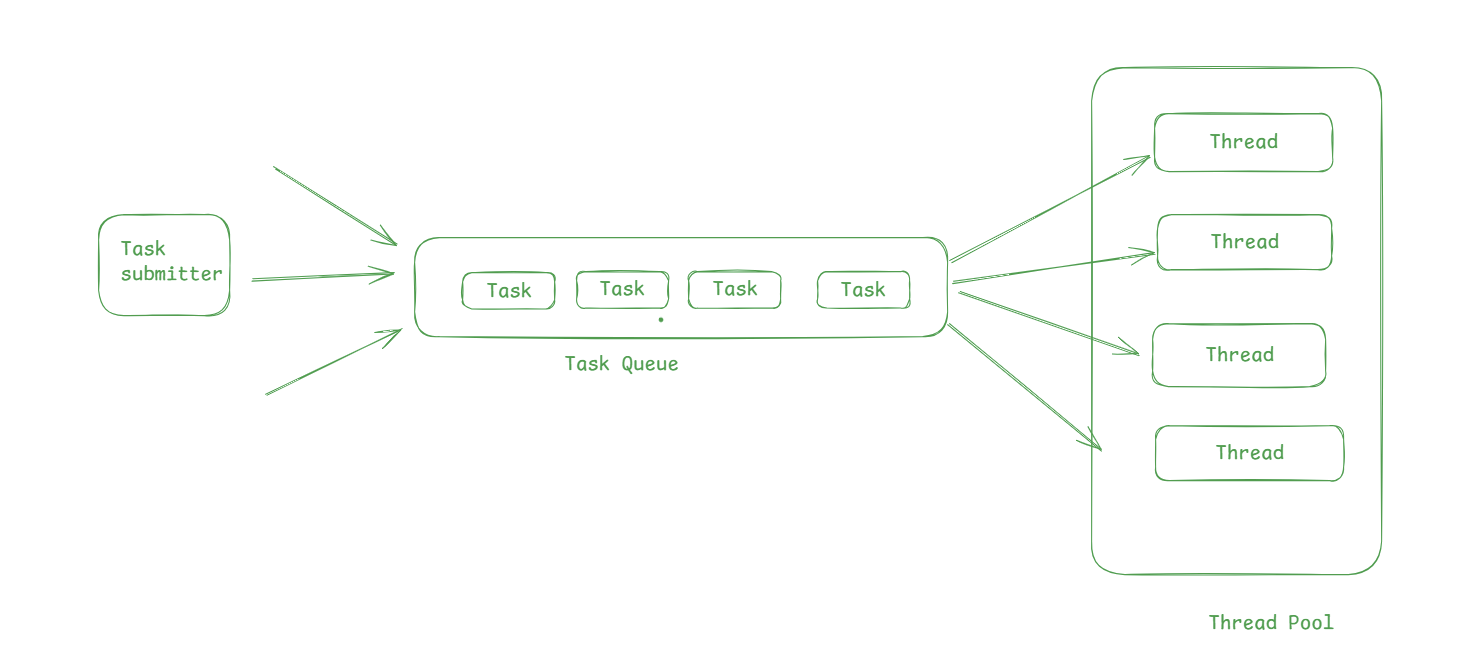
A ThreadPool is a collection of pre-created worker threads that efficiently handle multiple tasks by reusing available threads. It helps improve performance by managing resources effectively, avoiding the overhead of creating and destroying threads repeatedly.
How many threads we can create in java? So number of threads we can create depends on various factor like
- CPU cores
- JV memory
- Task nature IO intensive or CPU intensive
- Os limits
While Java theoretically allows for tens of thousands of threads, creating too many threads may lead to:
- Resource exhaustion: Running out of system memory, causing the JVM to fail.
- Context switching overhead: Too many threads may increase the context-switching overhead and degrade performance.
Why Use a ThreadPool?
- Reduces thread creation overhead.
- Manages resource utilization efficiently.
- Prevents system crashes due to excessive thread creation.
- Optimizes performance for concurrent tasks.
Executor and ExecutorService
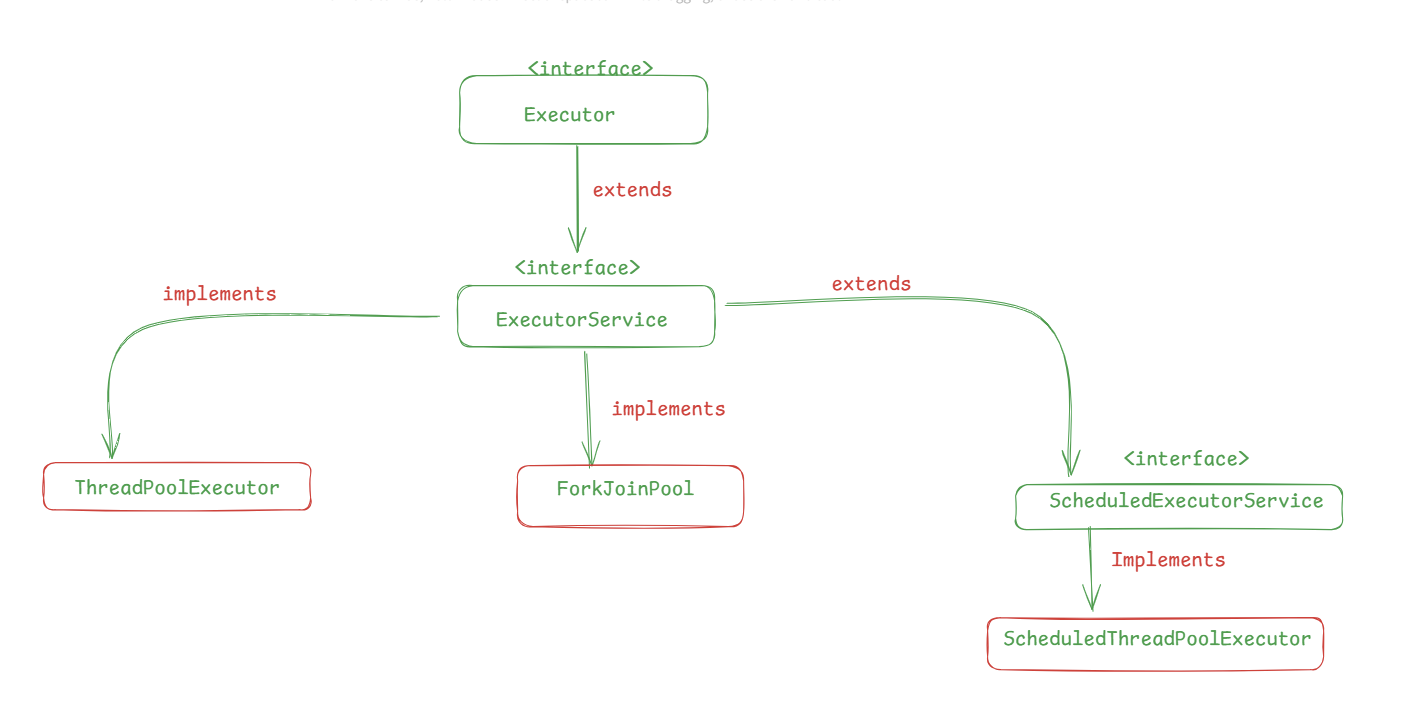
Executor interface which provide only one method to invoke the task i.e execute method
void execute(Runnable command);
ExecutorService interface extends Executor interface and provide more methods to control the progress of the tasks and manage the termination of the service.
ExecutorService executorService = Executors.newFixedThreadPool(5);
Future<String> future = executorService.submit(() -> "Hello Badal"); // some operations
String result = future.get();
ExecutorService provide submit method which can both take callable and runnable. Runnable’s single method does not return any value and neither throw any exception
Callable allow us to throw an exception and return an value
@FunctionalInterface
public interface Runnable {
    /**
     * Runs this operation.
     */
    void run();
}

@FunctionalInterface
public interface Callable<V> {
    /**
     * Computes a result, or throws an exception if unable to do so.
     *
     * @return computed result
     * @throws Exception if unable to compute a result
     */
    V call() throws Exception;
}
2. ThreadPoolExecutor
ThreadPoolExecutor is an extensible threadpool implementation which manages a pool of worker threads efficiently.
Why to Use ThreadPool instead of creating Thread everytime
1. Efficient Thread Management - Reuses threads instead of creating new ones for every task.
2. Performance Optimization - Reduces thread creation overhead, improving performance.
3. Customizable Behavior - Allows fine-tuning of core threads, max threads, queue size, and rejection policies.
Whith ThreadPoolExecutor we can have more control over the thread creation and its management we can pass multiple parameters like corePoolSize, MaxPoolSize, keepAliveTime, workQueue
ThreadPoolExecutor(int corePoolSize,
                              int maximumPoolSize,
                              long keepAliveTime,
                              TimeUnit unit,
                              BlockingQueue<Runnable> workQueue)
Lets understand all the parameters one by one
-
corePoolSize
This is the number of threads that will be present when we initiate a threadpool. lets say corePoolSize=5 this means 5 thread will be created and added to threadpool initially
-
maximumPoolSize
It is the maximum number of thread that a threadpool can grow to.if all core threads are busy and the internal queue is full, the pool is allowed to grow up to maximumPoolSize**.**
-
keepAliveTIme
Time a thread(excess thread apart from corePoolSize) remains idle before terminating
-
unit
unit of keepAliveTime, Hour, Minute etc
-
workQueue
A Task Queue (also called a Work Queue) in
ThreadPoolExecutoris used to hold tasks waiting to be executed when all core threads are busy.
What happens when a task is submitted toThreadPoolExecutor
When a new task is submitted to ThreadPoolExecutor:
1. If there are idle core threads (corePoolSize), the task is assigned to an available thread immediately.
2. If all core threads are busy, the task is added to the task queue (BlockingQueue).
3. If the queue is full and the number of threads is less than maximumPoolSize, a new thread is created.
4. If both the queue is full and maximumPoolSize is reached, the task is rejected based on a Rejection Policy.
Apart from above parameters we can also pass two more parameter threadFactory and RejectedExecutionHandler while creating threadpool
By default, Java’s Executors create new threads using new Thread(), but ThreadFactory allows:
1. Custom thread naming
2. Setting thread priorities
3. Creating daemon threads (threads that do not prevent JVM shutdown)
4. Applying thread-specific configurations
//constuctor
ThreadPoolExecutor(int corePoolSize,
                              int maximumPoolSize,
                              long keepAliveTime,
                              TimeUnit unit,
                              BlockingQueue<Runnable> workQueue,
                              ThreadFactory threadFactory,
                              RejectedExecutionHandler handler)

public class CustomThreadFactory implements ThreadFactory {
    private final AtomicInteger threadCount = new AtomicInteger(1);
    private final String namePrefix;

    public CustomThreadFactory(String namePrefix) {
        this.namePrefix = namePrefix;
    }

    @Override
    public Thread newThread(Runnable r) {
        Thread thread = new Thread(r, namePrefix + "-Thread-" + threadCount.getAndIncrement());
        return thread;
    }
}

//create new threadpool
ExecutorService executor = new ThreadPoolExecutor(
    2, 4, 60, TimeUnit.SECONDS,
    new LinkedBlockingQueue<>(),
    new CustomThreadFactory("WorkerPool")
);
RejectedExecutionHandler → When using ThreadPoolExecutor, if a task cannot be accepted (e.g., the queue is full, and all threads are busy), the task is rejected.
The RejectedExecutionHandler interface allows you to define a custom rejection policy to decide what happens when a task is rejected.
| Policy | Behavior |
|---|---|
| AbortPolicy (Default) | Throws RejectedExecutionException. |
| DiscardPolicy | Silently discards the rejected task. |
| DiscardOldestPolicy | Removes the oldest task in the queue and retries adding the new task. |
| CallerRunsPolicy | Runs the task in the calling thread instead of the pool. |
ExecutorService executor = new ThreadPoolExecutor(
2, 4, 10, TimeUnit.SECONDS,
new ArrayBlockingQueue<>(2),
new ThreadPoolExecutor.AbortPolicy());
Executors in java
Executors utility class is part of the java.util.concurrent package and provides factory methods for creating different types of executor services. This class helps to simplify the process of creating and configuring thread pools, making it easier to work with concurrent tasks without having to manage thread creation and execution manually
The Executors class contains static methods that return pre-configured implementations of ExecutorService, ScheduledExecutorService, and Executor interfaces. These are some of the most commonly used executor implementations in Java for managing and executing tasks in a multi-threaded environment.
- newFixedThreadPool(int nThread)
As per official documentaion: Creates a thread pool that reuses a fixed number of threads operating off a shared unbounded queue. At any point, at most nThreads threads will be active processing tasks. If additional tasks are submitted when all threads are active, they will wait in the queue until a thread is available. If any thread terminates due to a failure during execution prior to shutdown, a new one will take its place if needed to execute subsequent tasks. The threads in the pool will exist until it is explicitly shutdown.
in short Creates a thread pool with a fixed number of threads. If all threads are busy, new tasks will be queued until a thread is available. This is useful when you have a known, fixed number of tasks to process concurrently.
public static ExecutorService newFixedThreadPool(int nThreads) {
    return new ThreadPoolExecutor(nThreads, nThreads,
                                  0L, TimeUnit.MILLISECONDS,
                                  new LinkedBlockingQueue<Runnable>());
}-
newCachedThreadPool()
As per official documentaion: Creates a thread pool that creates new threads as needed, but will reuse previously constructed threads when they are available. These pools will typically improve the performance of programs that execute many short-lived asynchronous tasks. Calls to execute will reuse previously constructed threads if available. If no existing thread is available, a new thread will be created and added to the pool. Threads that have not been used for sixty seconds are terminated and removed from the cache. Thus, a pool that remains idle for long enough will not consume any resources. Note that pools with similar properties but different details (for example, timeout parameters) may be created using ThreadPoolExecutor constructors.
Returns: the newly created thread pool
It uses synchronous queue which means there is direct handoff between producer and consumer as the size of this synchronousQueue will be 1 always
In short Creates a thread pool that creates new threads as needed, but will reuse previously constructed threads when available.
This type of pool can grow as needed but has no upper limit (except for system constraints like memory). Tasks that finish early can help process subsequent tasks.
public static ExecutorService newCachedThreadPool() \{ return new ThreadPoolExecutor(0, Integer.MAX_VALUE, 60L, TimeUnit.SECONDS, new SynchronousQueue<Runnable>()); \} -
newSingleThreadExecutor()
As per official documentaion: Creates an Executor that uses a single worker thread operating off an unbounded queue. (Note however that if this single thread terminates due to a failure during execution prior to shutdown, a new one will take its place if needed to execute subsequent tasks.) Tasks are guaranteed to execute sequentially, and no more than one task will be active at any given time. Unlike the otherwise equivalent newFixedThreadPool(1) the returned executor is guaranteed not to be reconfigurable to use additional threads.
Returns: the newly created single-threaded Executor
public static ExecutorService newSingleThreadExecutor() \{ return new FinalizableDelegatedExecutorService (new ThreadPoolExecutor(1, 1, 0L, TimeUnit.MILLISECONDS, new LinkedBlockingQueue<Runnable>())); \} -
ScheduledThreadPoolExecutor
The
ScheduledThreadPoolExecutorclass extends theThreadPoolExecutorclass and implements theScheduledExecutorServiceinterface, providing several additional methods that are specifically designed for scheduling tasks with delays or periodic execution. These methods allow for greater control over when and how tasks are executed.Key Methods of ScheduledThreadPoolExecutor:
-
schedule(Runnable command, long delay, TimeUnit unit):- This method allows us to run a task once after a specified initial delay. The task is scheduled to execute after the delay has passed, and only a single execution occurs.
- Use this When you need a one-time delayed execution of a task.
-
        javaCopyScheduledExecutorService scheduler = Executors.newScheduledThreadPool(1);
scheduler.schedule(() -> System.out.println("Task executed after delay"), 5, TimeUnit.SECONDS);-
scheduleAtFixedRate(Runnable command, long initialDelay, long period, TimeUnit unit):
- This method allows us to repeatedly execute a task with a fixed rate. The task is first delayed by the initialDelay, and then executed repeatedly at fixed intervals defined by the period.
- The period is the time between the start of each execution, meaning tasks will start at regular intervals regardless of how long each task takes to execute.
- Use this When you need periodic execution of tasks, such as in scenarios like polling or heartbeats.
scheduler.scheduleAtFixedRate(() -> System.out.println("Task executed at fixed rate"), 2, 10, TimeUnit.SECONDS);-
scheduleWithFixedDelay(Runnable command, long initialDelay, long delay, TimeUnit unit):
- This method is simmilar to scheduleAtFixedRate, but with a small difference: it schedules tasks at a fixed delay between the end of one execution and the start of the next. The execution rate may vary depending on how long each task takes to run.
- The
delayis the time between the completion of one task and the start of the next. This allows for some flexibility in the execution schedule. - When you need repeated task executions, but want the interval between executions to be measured from the completion of the previous task, ensuring a consistent gap between tasks rather than a fixed start time.
scheduler.scheduleWithFixedDelay(() -> System.out.println("Task executed with fixed delay"), 2, 10We will learn More about Concurrency, Locking, ForkJoinPool etc in next article.
I hope you understood the inversion of control and dependency injection. follow me for more engaging software engineering content!
Happy Coding🚀🚀