Kubernetes Essentials: Unlocking the Power of Container Management
3 min read #kubernetes #containers #software-development #backend
So what the hell is Kubernetes? We have learned about Docker and seen how it containerizes our applications, allowing them to run in isolated environments called containers. So if we already have docker and other containerization tools then what is the need of Kubernetes.
So, we will dive deep into the world of Kubernetes. Since it is vast, we will cover it step by step.
- Introduction to Kubernetes, What is the need of it if we have docker already?
- Architecture of Kubernetes
- Working with Kubernetes Objects
- Networking and persitent storage
- security in kubernetes
In this article we are going to see the first two part and rest will cover in next articles.
1. Introduction to Kubernetes
So let’s explore the challenges with containerization. While Docker is a popular tool, it’s important to recognize that there are other containerization solutions like containerd. We will focus on Docker to illustrate these concepts, but the principles apply broadly across various containerization technologies.
problems with docker:
- Single Host: Docker on a single host can only support as many containers as the host’s resources allow. As your application grows, this setup becomes a bottleneck, making it difficult to scale effectively.
- Auto Healing: If a container fails or crashes, it won’t automatically recover on its own. DevOps engineers must manually monitor and restart failed containers, which can be time-consuming and prone to human error, especially in large-scale environments.
- Auto Scaling: There is no auto scaling in case of container if the traffic increases and load increases we have to manually spin more container it will not automatically scale
- Automated rollouts, scaling, and rollbacks: Kubernetes manages your application by automatically creating the desired number of replicas, distributing them across appropriate hardware, and rescheduling containers if a node fails. It allows for on-demand scaling of replicas in response to changing conditions, such as CPU usage, ensuring your application remains resilient and responsive.
These are the problems that kubernetes solve lets understand what is kubernetes and how it solved above problems.
So according to kubernetes official documentation Kubernetes also known as as K8s, is an open source system for automating deployment, scaling, and management of containerized applications. and best part is it does all of this without you having to supervise or get involved. Obviously, you have to set things up in the first place, but once you’ve done that, you sit back and let Kubernetes work its magic.
You must be thinking why it is called k8s? because there are 8 letter between k and s in kubernetes simple there is nothing important in it.
2. Architecture of Kubernetes
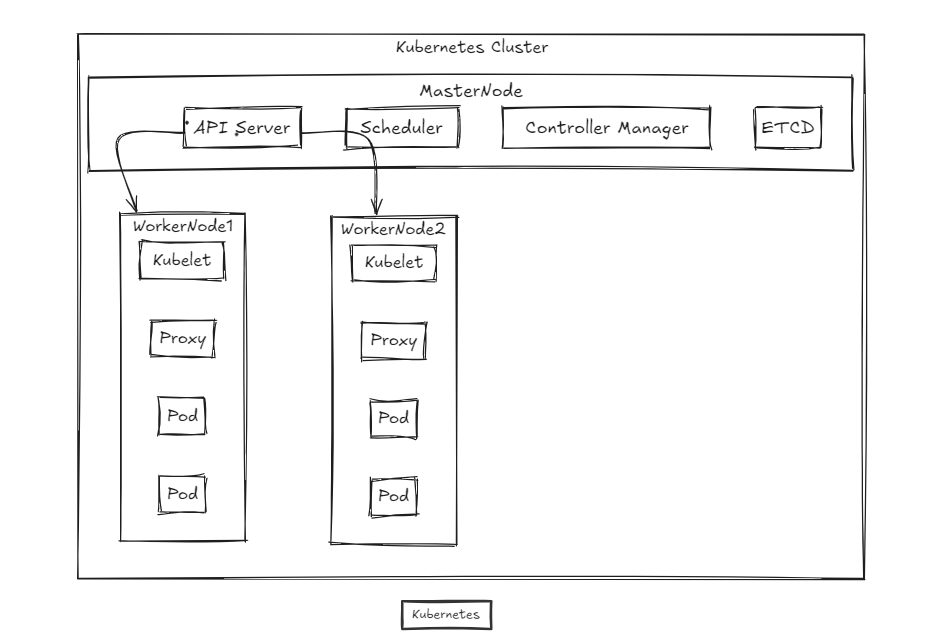
This is the basic kubernetes architecture. we will go through each and every component and learn about its working.
Master Node
Master Node is also called as control plane is responsible for managing whole clusture. It monitors the health check of all nodes in the cluster. It manages the information about all the nodes in a cluster, including which containers are assigned to which worker nodes. It continuously monitors both containers and nodes, and if a worker node fails, Kubernetes automatically shifts the workload from the failed node to another healthy node.
The Kubernetes master is responsible for key tasks such as scheduling, provisioning, and configuring the cluster, as well as exposing APIs to clients. The master node uses various control plane components to handle these responsibilities efficiently.
Kubernetes also simplifies many complex tasks for developers, such as service discovery, scaling, load balancing, self-healing, and leader election. This means developers no longer need to build these services into their applications, as Kubernetes handles them automatically.
Four basic component of Master Nodes are
- Api server
- Scheduler
- Controller
- Etcd
1.Api server
It acts as the main communication hub for all operations within the cluster. It exposes the Kubernetes API, which other components and external tools can use to interact with the cluster. All other component such as Scheduler, Controller will Communicate to api server before taking any action.
The API server receives and processes RESTful API requests like kubectl commands from users, administrators, and other components within the cluster.The API server serves as the gateway for interacting with the cluster’s state. It reads and writes data to the etcd database, which stores the entire cluster’s state, including information about nodes, pods, services, and configurations.The API server manages authentication and authorization, ensuring that only legitimate users or services with the right permissions can interact with the cluster.